> For the complete documentation index, see [llms.txt](https://docs.heypoplar.com/llms.txt). Markdown versions of documentation pages are available by appending `.md` to page URLs; this page is available as [Markdown](https://docs.heypoplar.com/platform-basics/mailing-data.md).
# Mailing Data
How to read and obtain a record of your campaigns' mailing history - as well as what's included
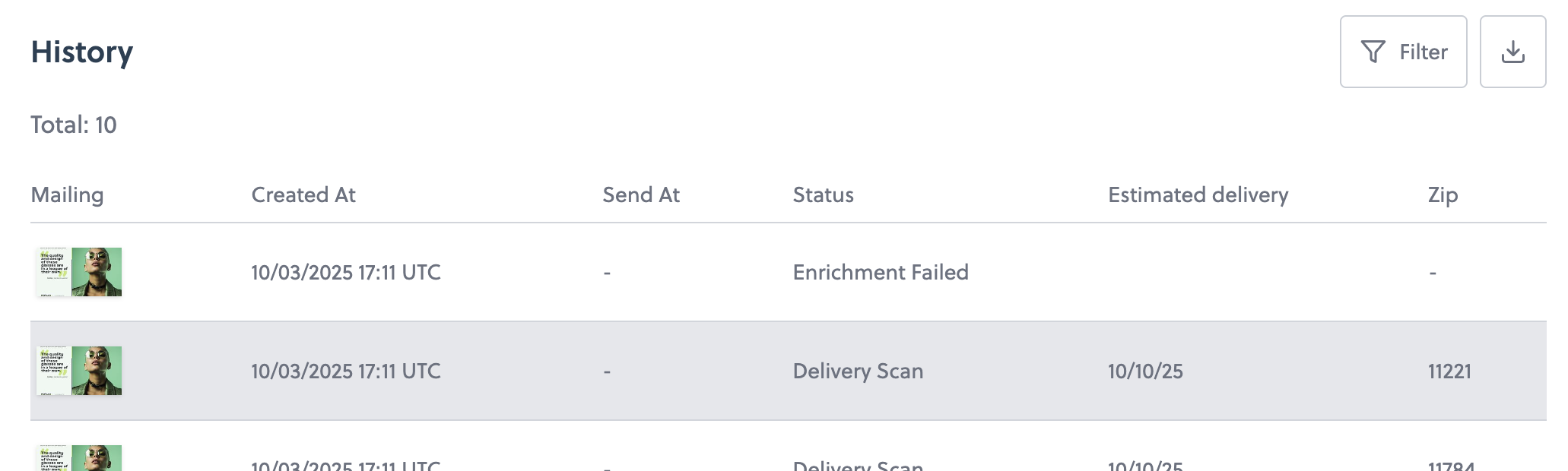
## Mailing History
The campaign overview's **History** section is going to be your greatest asset for tracking the status of individual mailers, testing integrations, and viewing incoming Request Details. Once a One Time Send has launched and processed or a trigger is set live and is sending requests, a list of individual mailers will start to appear.
{% hint style="info" %}
**If testing a trigger integration,** the History section is where you'll want to look to confirm the requests are successful, merge tags are populating correctly, and all the necessary mailing data is coming through as expected.
{% endhint %}
## Mailing States & Environment
In the top right you'll see a tool for filtering by Mailing State and/or API Environment, the option to Download a CSV record, and a calendar tool for filtering by date. In the top left you'll see a mailing count which reflects the filter settings.
Status
Description
processing
Confirming all details of the mailing and production.
production
The mailer has passed data and suppression checks and is in print production.
holdout
Not mailed as part of the control group.
suppressed
The mailer recipient was found on your Do Not Mail list, or suppressed due to another setting such as regional, domain, or recently mailed.
delivered
Scanned and processed for delivery by USPS.
in_transit
The mailer has received one or more USPS mail scans and is on its way to the recipient. The Mailed state also falls under in-transit.
exception
An exception occurred while processing. This includes invalid addresses, unmatched emails for Address Enrichment, campaign budget exceeded, or insufficient account credit.
production_key
Successful trigger requests using your Production API Key.
test_key
Incoming trigger requests using your Test API Key.
**Numbers and mailing status are most accurately reflected under the History tab.** While the graphs shown on the overview page are a useful visual aid, always refer to the campaign History for the most detailed account.
Once a mailer is **In Transit** or **Mailed**, status updates are based on incoming scans from USPS. If you notice a slight lag in delivery updates, we recommend checking back in later or the following day in case USPS hasn't updated their data yet.
***
## Download History
The Mailing State, Environment and Calendar filter setting will be applied when downloading a CSV record. Shortly after clicking Download CSV, you'll receive an email from with a download link - this email can take up to 15 minutes to arrive depending on the amount of data requested.
### Single Campaign
Click into a campaign and scroll to the bottom to arrive at the History section. Filter dates and states as needed, then click the download button to receive an email containing the CSV file.
### All Campaigns (Mailing Data)
To download the Mailing History for all campaigns across your account, head to the [Mailing Data](https://app.heypoplar.com/integrations/mailing) page under Integrations - this also appears as the Exports tab:
### Data Columns
Both downloads will contain the following data columns:
| Column | Description |
| ------------------------ | ------------------------------------------------------------------------------------------------------------------------------------------------------------------- |
| campaign\_id | The ID of the parent campaign. |
| campaign\_name | The name of the parent campaign. |
| mailing\_id | The ID of the individual mailing. |
| current\_state | The current state of the mailing. |
| mailing\_time | The timestamp when the mailing was created. This is in UTC. |
| scheduled\_for | The scheduled mailing time (if set). |
| postage\_type | The type of postage applied to the mailing (usually either first class or standard mail). |
| format | The format of the mailing (e.g. "6x9 postcard") |
| creative\_id |
The ID of the creative used for the mailing. If you are running an A/B test of multiple creative then this will be different per creative.
|
| creative\_name | The name of the creative used for the mailing. |
| email | The email address submitted with the mailing. |
| external\_id | The external\_id provided when creating the mailing. |
| name | The name printed on the mailing. |
| address\_1 |
Address line 1 When using the address append functionality, as per our terms of use, this information is redacted and not provided for download.
|
| address\_2 |
Address line 2 When using the address append functionality, as per our terms of use, this information is redacted and not provided for download.
|
| city | |
| state | |
| postal\_code | 5 digit postal code |
| postal\_code\_ext | 4 digit postal code extension |
| expected\_delivery\_date |
The expected delivery date of the mailing. This is an estimate calculated based on submission time and historical mailing data.
|
| actual\_delivery\_date | The date of the USPS delivery scan. Typically this occurs at the local post office, within 0-48 hours of the mailing arriving at the recipients mailbox. |
| estimated\_cost | The estimated cost of the send based on the postage and format of the mailing. |
| send\_type | The type of send. Valid values are `API` and `MANUAL`. This indicates if the mailing was triggered by our API or if it was created as a one-time send. |
| manual\_send\_id | This allows you to group mailings that are part of a one-time send. |
| merge\_tags | The merge tags used for the mailing. |
| environment | This indicates if a test API key was used for the mailing. Valid values are `test` and production. |
***
## Indvidual Mailers
Each individual mailer, along with a unique mailing ID will appear listed under the History section. Click into a mailer to see a summary of the **Mailing Details, Event Log, and Request Details.** If the mailer is or was in print production, you'll see an image preview with address and merge tag (if applicable) data applied and the option to download a PDF proof:
### Mailing Details
Under the **Mailing Details** you see the Recipient Address, Campaign name, Creative name, Postage Type, Trigger Source (API Request or Manual Send), Creative Type, send\_at trigger setting, Estimated Cost (price per piece), and a list of any custom merge tags used showing their name and value as populated based on mailing data.
### Event Log & Request Details
The Event Log shows a Timestamped record of how long the mailer spent in each step of the mail cycle from **Created** to **Delivered.**
If the mailer was launched via trigger or integration with our Mailing API, the individual webhook data will be shown in the **Request Details.**
---
# Agent Instructions
This documentation is published with GitBook. GitBook is the documentation platform designed so that both humans and AI agents can read, navigate, and reason over technical content effectively. Learn more at gitbook.com.
## Querying This Documentation
If you need additional information that is not directly available in this page, you can query the documentation by asking a question.
Perform an HTTP GET request on the following URL with the `ask` and `goal` query parameters:
```
GET https://docs.heypoplar.com/platform-basics/mailing-data.md?ask=&goal=
```
`ask` is the immediate question: it should be specific, self-contained, and written in natural language.
`goal` is what the user is ultimately trying to achieve, the reason they need the answer. Sharing it helps GitBook give you a better, more relevant answer. A goal is most helpful when it describes the outcome the user wants rather than restating the question. For example, with `ask=how do I create an API token`, a goal like `automate deployments from our CI pipeline` lets GitBook tailor the answer to that use case.
The response will contain a direct answer to the question and relevant excerpts and sources from the documentation.
Use this mechanism when the answer is not explicitly present in the current page, you need clarification or additional context, or you want to retrieve related documentation sections.