> For the complete documentation index, see [llms.txt](https://docs.heypoplar.com/llms.txt). Markdown versions of documentation pages are available by appending `.md` to page URLs; this page is available as [Markdown](https://docs.heypoplar.com/platform-basics/transactional-data/shopify-order-data.md).
# Shopify Order Data
Download the Poplar Shopify App to instantly start sharing Order data with the platform.
## Poplar Shopify App
Download the [Poplar Shopify App](https://apps.shopify.com/poplar-1) to instantly start sharing order data in the platform. You can confirm the connection is successful if you head to your Poplar **Audiences** and click into **Customers (Orders API)**, you should see a list of customer shipping and billing addresses start to populate as orders roll in. Eventually, you'll see data start to populate the **Transactions** page as well.
{% hint style="warning" %}
If you enable Transactional Reporting after your initial in-home date, you'll have to backfill the order data by exporting from Shopify and **manually uploading** a CSV to the Transactional Data tab in your Poplar account.
{% endhint %}
## Exporting Orders from Shopify
If you enable data sharing via Shopify after a campaign has reached homes, you'll need to back-fill the order data manually by exporting a CSV from Shopify and uploading it to Poplar to generate the correct metrics.
### **How to Export**
When exporting order data, you'll want to follow the steps detailed in Shopify's documentation linked below:
It is important to filter your orders to include only the relevant data, otherwise you will likely run into issues when uploading your CSV to Poplar, or end up with incorrect metrics.
* **Delivery Method:** ship to customer
* **Payment status:** authorized, paid, partially paid
* **Date:** first campaign launch - present/date when transactional data sharing was turned on
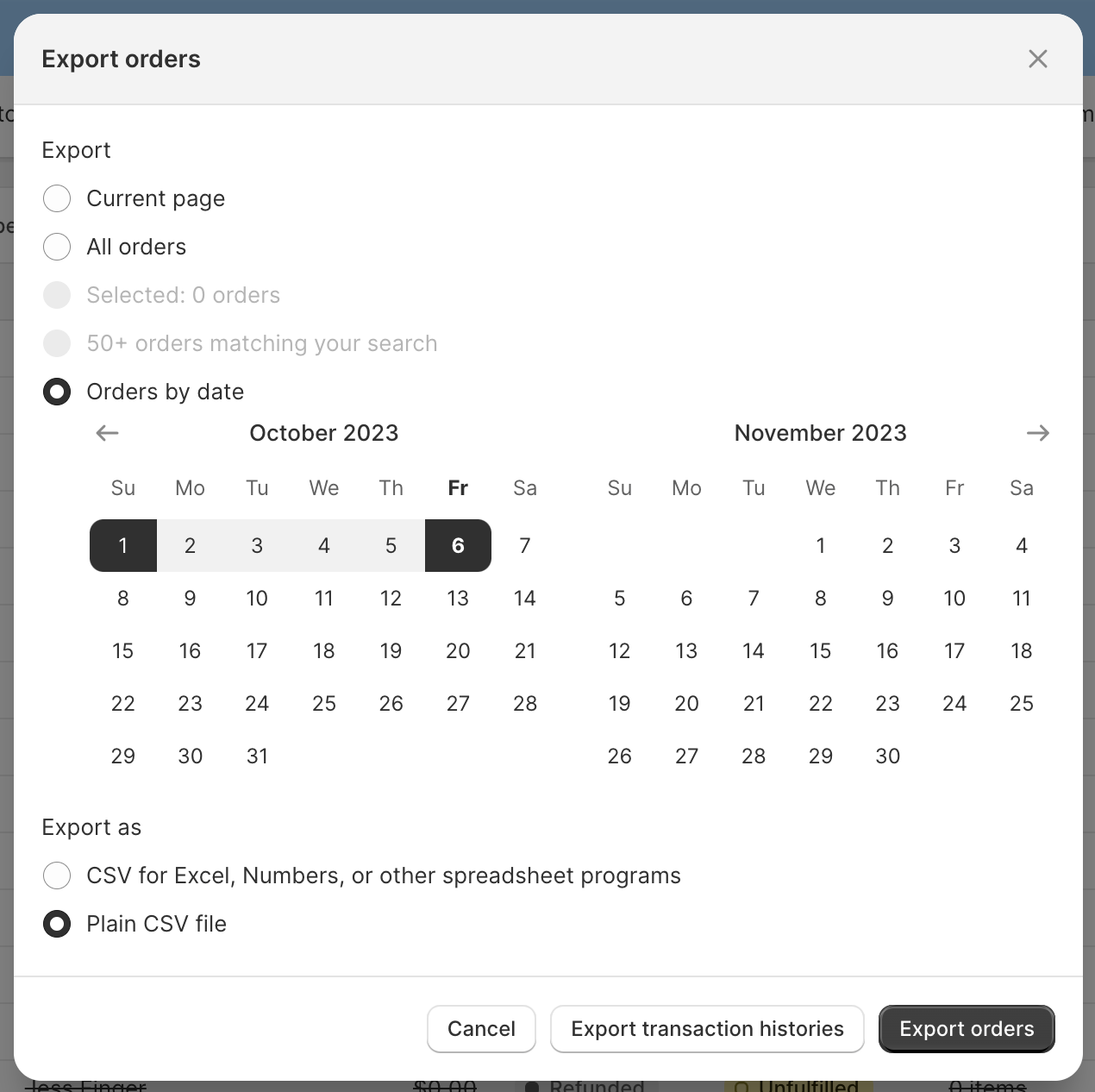
Next you'll want to click Export in the top right, specify the date range if necessary, select Plain CSV file then Export orders:
### **How to Upload**
Minor formatting adjustments will need to be made to your CSV before it can be successfully uploaded to Poplar. We recommend making these updates in Excel (if you're proficient), or copy and pasting the required columns into Google Sheets to make adjustments.
| Shopify Column | Poplar Required Field | Format |
| -------------------------------------------------------------------------------------------------------------------- | ------------------------------------------------------------------------------------------------------------------------ | ------------------------------------------------------------------------------------------------------------------------------------------------------------------------------------------------------------- |
| Name | order\_id |
Integer (Not scientific notation) 10004
|
| Created at | order\_date |
ISO8601 Date YYYY-MM-DD
|
| Total | total |
Number 0.00
|
|
Billing Name Billing Address1 Billing Address2 Billing City Billing Province Billing Zip
| *Optional to include with Billing Address data* |
| Email | email |
Can be used to match against campaigns that mailed using emails for Address Enrichment This data is not stored by Poplar, it is used to compute a hash and then discarded
|
The platform will automatically dedupe records by Order ID. Shopify will export individual items in an order under the same Order ID, but the total for the order will only be present on one record, which is why you'll see a number of blank rows in the total column - this is expected and will not skew attribution results.
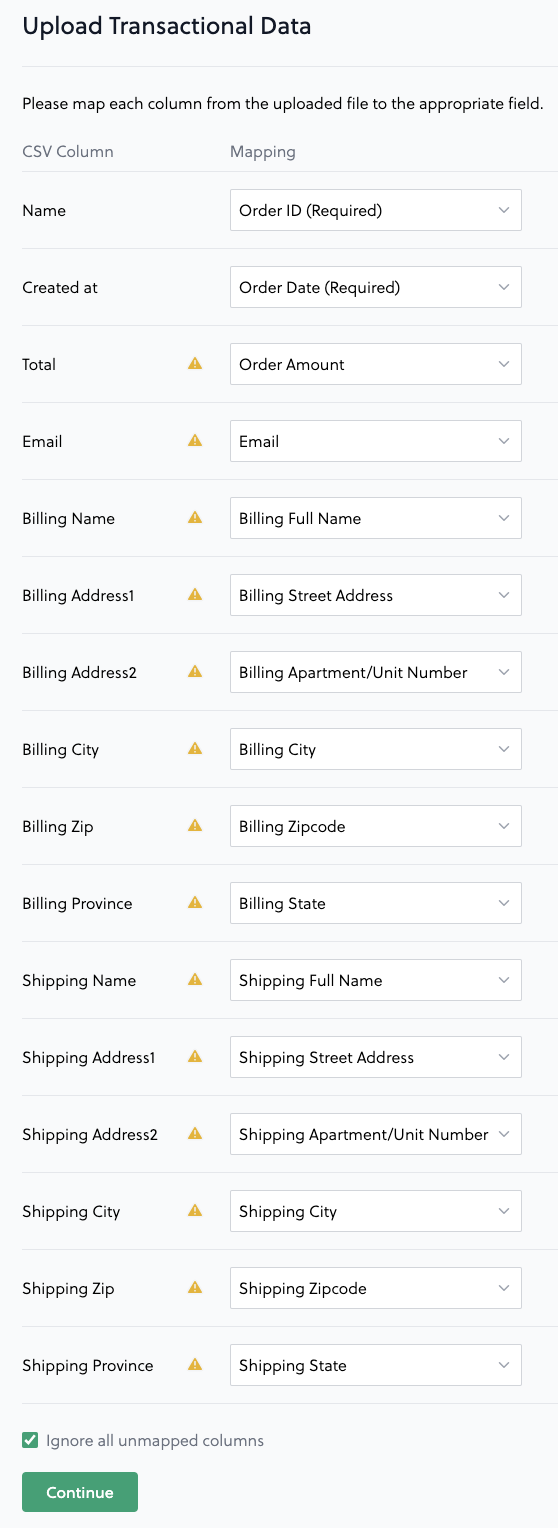
Once you've double checked your column headers and formatting, head to the [Transactions](https://app.heypoplar.com/transaction) page in Poplar and click **Upload Transactional Data** to upload your CSV. Map the headers accordingly
---
# Agent Instructions
This documentation is published with GitBook. GitBook is the documentation platform designed so that both humans and AI agents can read, navigate, and reason over technical content effectively. Learn more at gitbook.com.
## Querying This Documentation
If you need additional information that is not directly available in this page, you can query the documentation dynamically by asking a question.
Perform an HTTP GET request on the current page URL with the `ask` query parameter, and the optional `goal` query parameter:
```
GET https://docs.heypoplar.com/platform-basics/transactional-data/shopify-order-data.md?ask=&goal=
```
`ask` is the immediate question: it should be specific, self-contained, and written in natural language.
`goal` is optional and describes the broader end goal you are ultimately trying to accomplish on behalf of the user. GitBook uses it to tailor the answer towards what is most useful for that goal.
The response will contain a direct answer to the question and relevant excerpts and sources from the documentation.
Use this mechanism when the answer is not explicitly present in the current page, you need clarification or additional context, or you want to retrieve related documentation sections.